Stacking plan for any date
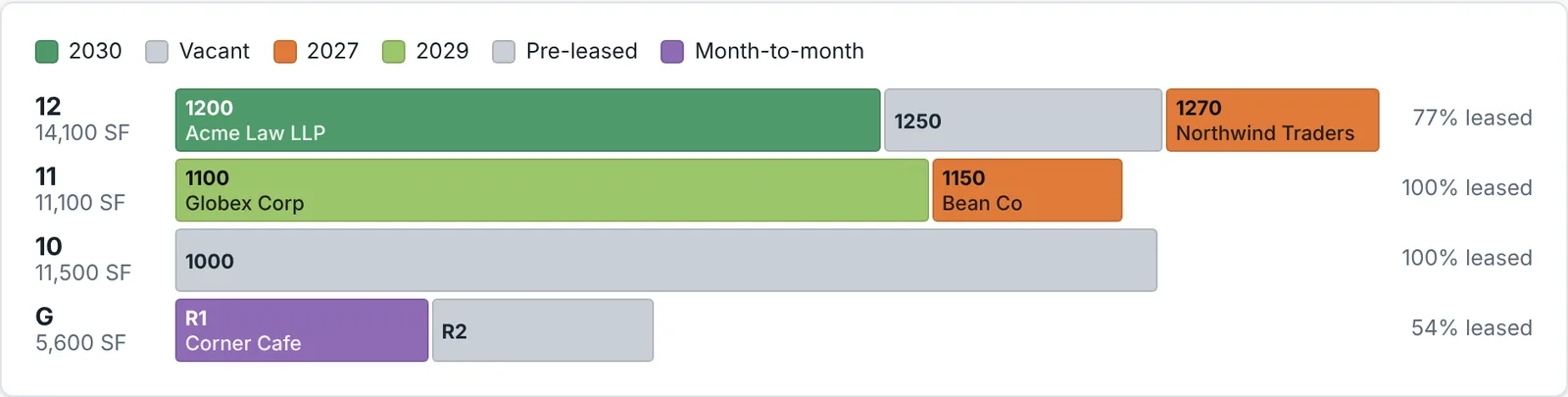
Pick a date or slide through the months to see the building as it was, or as signed leases will make it. Colour by status, expiration year, rent vs market, unit type, industry or tenant. Export a clean PDF for the board.
For building owners, asset managers and leasing teams
See every floor, suite and unit — who is in it, when the lease ends and what it earns. Import your rent roll, and LayerPlans draws the building, works out the figures and keeps everyone looking at the same picture.
Office, multifamily and mixed-use · 14-day free trial at launch
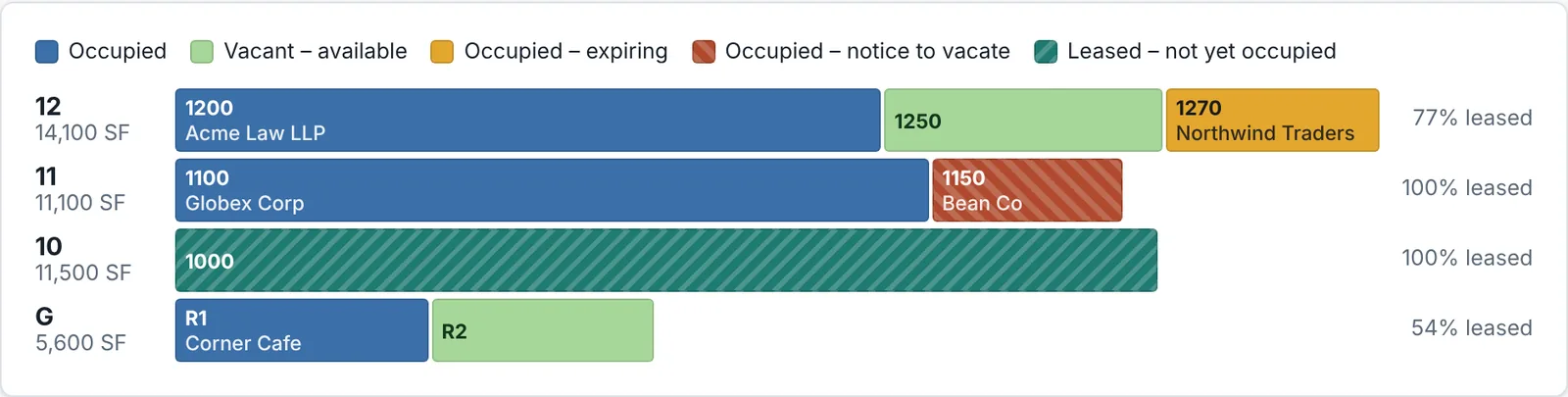
Built for the questions owners and brokers ask every week: what is vacant, what expires next, and how are we doing against market.
Pick a date or slide through the months to see the building as it was, or as signed leases will make it. Colour by status, expiration year, rent vs market, unit type, industry or tenant. Export a clean PDF for the board.
Upload a CSV export from Yardi, MRI, AppFolio or a spreadsheet. LayerPlans matches the columns, shows exactly what will be created or changed before anything is saved, and lets you undo the import for 7 days.
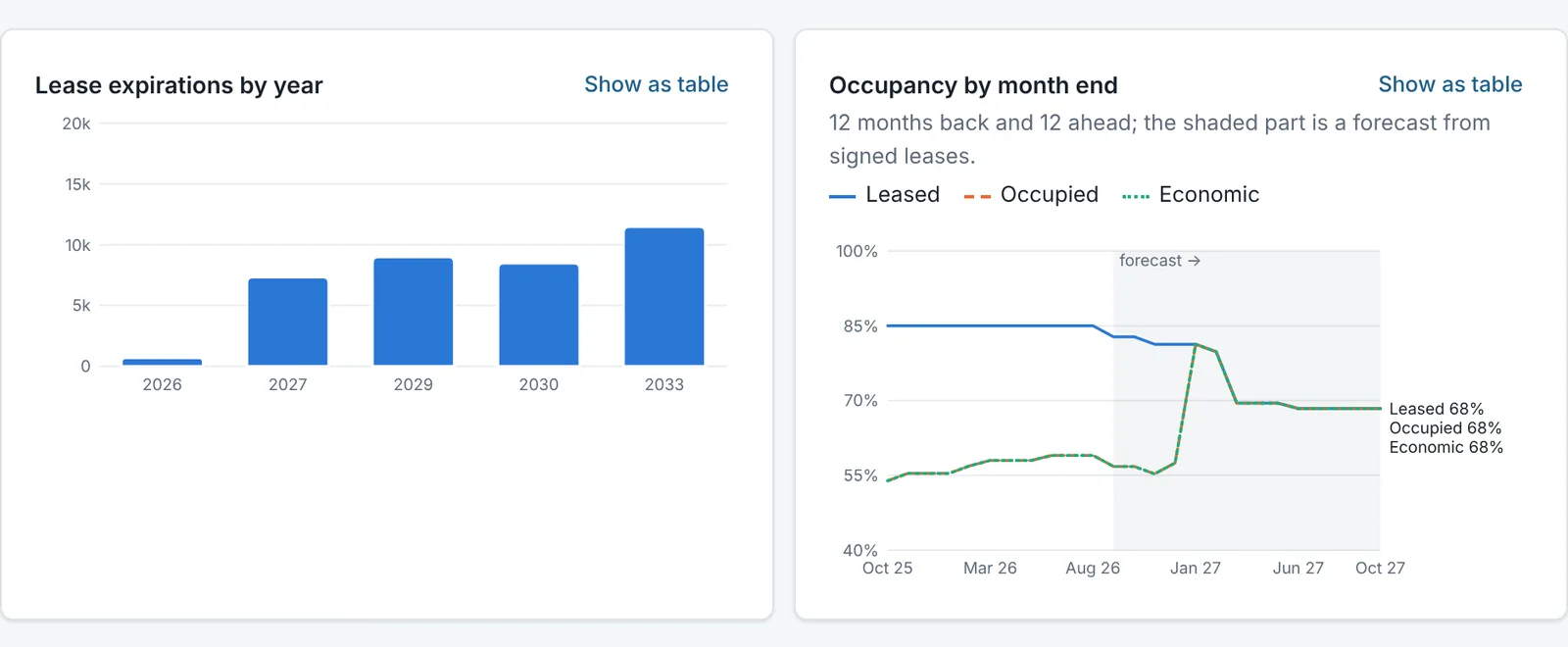
Leased, occupied and economic occupancy, WALT, in-place rent and rent per SF, unit mix and expirations by year — for one building or the whole portfolio. Hover any number to see how it was calculated.
Track prospects from inquiry to signed lease on a simple board. See which vacant suites have deals in play right on the stacking plan, and turn a signed deal into a lease without typing it twice.
Send brokers, lenders or partners a link to the plan and figures for one building or the whole portfolio. No login, no extra seat, and you can turn it off any time.
A short daily email with leases expiring in 12, 6 and 3 months, option notice deadlines, notices to vacate and upcoming move-outs — only for the buildings each person looks after.
Colour the plan by lease expiration year and the next three years of rollover jump out. The portfolio dashboard shows expirations by year and occupancy month by month — twelve months back, and twelve ahead from the leases you have already signed.
Use your own export or our office and multifamily templates. Check the preview, then import.
Floors, suites and units, leases, rent steps and options are set up for you. Adjust anything by hand.
Track deals, record notices and renewals, attach lease documents, and share links with the people who need them.
Suites by floor, RSF, rent per SF, expense recovery, options and concessions.
Units by type, market vs in-place rent, unit mix, turnover and move-outs.
Retail at grade, offices or apartments above — one plan, figures split by use.
Your buildings and leases live in their own database, never mixed with another customer's. Data is stored in the United States.
Six roles from Owner to Viewer, and you can limit any person to the buildings they work on.
Every change is recorded with who and when. Download everything — every table and every document — as one file, any time.
Simple per-user pricing, with a 14-day free trial and no card needed to start.
Prices will be announced at launch. Early-access members hear first.
Request early accessAny system that can export a rent roll as a CSV file — for example Yardi, MRI or AppFolio (an Excel sheet can be saved as CSV). LayerPlans matches common column names automatically, and you can adjust the matching before importing.
No. A rent-roll import creates buildings, floors, suites or units, tenants and leases in one go. You can add rent steps, options and concessions afterwards.
Only if you send them a share link. Links are read-only, expire after 7, 30 or 90 days, and can be turned off at any time.
You can download a full export at any time. If you cancel, your company becomes read-only and you can still view and download everything.
We are opening LayerPlans to a small group of early users first. Request access below and we will be in touch.
Tell us a little about your buildings. We will email you when your access is ready — usually within a few days.